Showing posts with label Internet. Show all posts

24.7.10

My Welcome

Ohai, reading through this blog again has been a really really interesting experience. I love how the Internet has made all these "memories" last forever. I'm still not going to update the blog regulary though. Maybe when I have more free time... Haha

16.4.09

My [How to setup your mac for Streamyx] Post

Alright since I already went through all the trouble of helping my mum set up her Streamyx on her computer I thought I might as well post it up. Hey who knows, it might help some hapless sap some day (or maybe even myself... LOL).


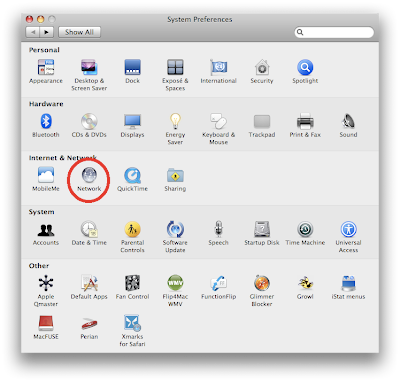
Anyway, step 1 involves you going into System Preferences. If you can't do that, please return your Mac and swear never to touch technology again. I'm serious.


Step 2: Go to Network
Step 2


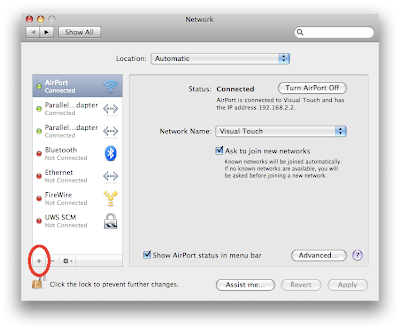
Step 3: Click on the + button
Step 3


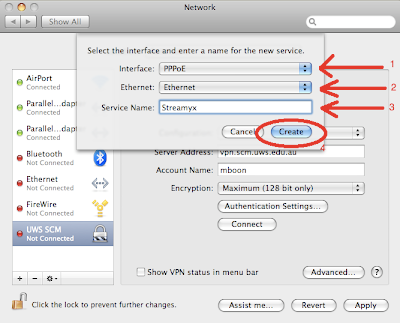
Step 4: Click on PPPoE, Choose Ethernet, and Enter the Service Name (can be anything)
Step 4


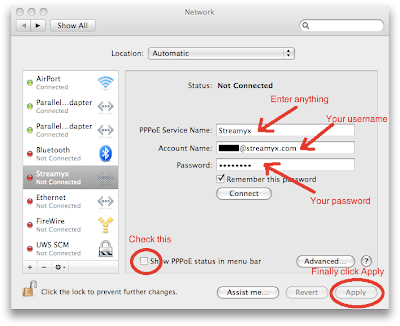
Step 5: Enter your details
Step 5


And thats it really. You can basically use these instructions for any PPPoE connection not necessarily just for Streamyx. Share and enjoy.
11.3.09

My Sixth Sense

Holy crap! Talk about pervasive information services. Man these guys at MIT are like freaking smart man. I'd suggest you go through the whole video plus the explanation but if you can't be bothered (cbb) then just skip over to about the 3:10 mark where the demo begins.


[Via Gizmodo via TED]

10.1.09

My Palm P(t)RE(e)

I have never been as excited -nor will I be as disappointed if it doesn't work- for a smartphone/mobile phone than this. Ladies and gentlemen, meet The Palm Pre (It rhymes with Tree if you didn't know that already :P).


Check out the whole in-depth impressions of it after the jump.

[Via Engadget]

29.12.08

My [Ye Olde Ads] Post

This is just so wrong at so many different levels but it just proves how much Microsoft tried to sell Windows in their early days. Steve Ballmer, still hate him.


19.12.08

My Geeky-ness

This cracked me up. Its a real geek post so "normal people" if you're bored, I understand :)


16.11.08

My Minority...

...Report? Haha, anyone still remember the cool computer interface that Tom Cruise used in Minority Report? Well it seems that one of the science advisors from that movie actually teamed up with a few other equally crazy people and have created the same interface that we saw. Damn cool!


[Via Engadget]

11.11.08

My Matrix

What if the Matrix ran on Windows. Hella funny. Check it out


9.11.08

My Digital Meets Real-Life

Ever wondered what Photoshop would look like in real life? Well wonder no more. There's a whole Flickr gallery devoted to "rendering" how Photoshop would look like in real life. Check it out!

Here's a preview of the final product.


The gallery can be found here. Coincidentally its done by some Indonesian chaps. Mighty impressive!

[Via Gizmodo]

29.10.08

My Inquisitive Inquisitor

Okay so maybe I am running out of titles to use. But cut me some slack people it ain't easy to use one theme of title only you know lol. And yes I have cheated along the way so bluek! Anyhoo, I have some awesome news. Well awesome to me because this is something which has made me switch back and forth between Safari and Firefox for like a very long time. Well starting from today, I can safely choose one because *drum roll* the very useful addon called Inquisitor is now a Firefox addon too! Seriously you have to use it to understand why its so damn good but once you do, you'll wonder how the heck you were searching before this. Its that good. Anyway, head on over to Mozilla's Addons site to get it Inquisitor Addon for Firefox. You can thank me later :)

Oh by the way, this is what it looks like.


As a side-note I'm using something called Glims over on Safari's side. Check it out here at www.machangout.com

22.10.08

My Foot Is Down!

After much soul-searching and much much patience, I have decided to divorce this thing called MSN. Seriously, its nothing but a pain-in-the-behind and the only reason I've stuck to it thus far is because all my friends seem to be on it. Well guess what, enough is enough! No more, I shall not tolerate a subpar Instant Messaging service anymore. And I suggest everyone follow me too. So that we can be free from the shackels of Microsoft (and be shackled to something else LOL). Anyway, I will be on Gtalk, AIM or Yahoo Messenger. So if anyone wants to catch me to chat (and is extremely cheap and does not want to sms/call me) I'll be there. Facebook too once adium supports facebook chats properly. Oh I'll also be on Skype so there! Take that Micrsoft!

10.10.08

My Widget Contribution

I don't know why I haven't done this sooner seeing as its quite easy to do, and that Apple has graciously provided all the tools necessary to build Dashboard Widgets. Anyhoo, here is my contribution. A widget which shows the RSS feed to both eztv and vtv, the two best places to get TV Series torrents in my humble opinion. Please download it and give me some feedback.

Daily TV Torrents Apple Dashboard widget


Features:
  • Click on the title to download the torrent file
  • Switch between eztv and vtv feeds

Ps: Does anyone wanna work on an icon and the look of it? Lemme know

11.9.08

My Other "Religion"

Well ok, so maybe not literally. But its one of my passions. What you may ask? Well, I am quite passionate about Star Wars. Yes, yes I know your geek-o-meter probably went *zingggg* but who cares, I'm a proud geek! So to all you other Star Wars fans out there, check out these two videos. Awesome stuff. Creativity is everywhere lol.

Star Wars theme with handbells


31.8.08

My Dream...

HTC Dream to be precise. Also goes by the name Google Phone or gPhone however you want to put it. But, more pictures have been leaked about it. While it may not be a looker, it certainly is going to be one heck of an iPhone competitor. I think...


Images from Gizmodo

26.8.08

My Android... Revisited

After what seems like an eternity. Finally, it looks like HTC is going to be releasing the HTC Dream aka the gPhone! While I'm sure that they wanted to keep it under wraps, its pretty hard especially with so many people curious about it and stringent controls which it has to pass in the US, like FCC and all that. That invariably, leads to "leaks". This is probably the most damning and probably would be what it would look like.


Image from android community


Can't wait for the end of the year! You can read the article here, enjoy :D

25.8.08

My [Good Grief This Could Be The Web] Post #4

Here's part 4 :)

21.8.08

My [Good Grief This Could Be The Web] Post #3

Here is part 3 of the video.


20.8.08

My Blog... Is Back!

After a brief one week hiatus of I-Don't-Know-Whats-Going-On-At-Google-But-My-Blog-Went-Down I'm back. Ready yourself as your brain gets turned into mush by the content here! Muahahahahaha...

14.8.08

My [How To Speed Up Safari] Post #2

I'm back with another handy tip on how to speed up Safari. Now this one really works. I've tried it and I'm noticing it immediately. This tip comes courtesy of Amdahl on the macrumors forum. (His post on it here). Its a little more involved this one and requires you to mess around with the terminal a bit more. But its worth it I assure you. Just make sure you follow the instructions line by line and cut&paste the instructions if you're not sure of it.

Manually defragging your Safari cache is often a big speed win on 10.5. In Terminal, with Safari closed, run the following lines. If you have other user accounts, log out and back in as each account and repeat:

PLEASE NOTE :::: THE SINGLE QUOTES on THECACHE line are from the quote on the tilde(~) key to the left of the number 1 key. You must use the correct quote! The double quotes around Cache.db are the usual double quote from pressing Shift with the key to the immediate left of your Return/Enter key. Or, just cut & paste!

cd ~/Library/Caches/com.apple.Safari
cp -Rp Cache.db Cache.db2
mv Cache.db2 Cache.db
cd /private/var/folders
THECACHE=`find . -iname "Cache.db" |grep Safari|head -n1`
cp -Rp $THECACHE ~/Cache.db2
mv ~/Cache.db2 $THECACHE

You'll get some permission denied from find. Don't mind them.
ONLY FOR 10.5! Safari on 10.4 has a different cache structure.

Credit Amdahl

11.8.08

My [How To Speed Up Safari] Post

For those of you who use both Safari3 and Firefox3 regularly and are torn between the two (like yours truly is) I'm sure you notice a difference in the "speed" of the two browsers when displaying pages. I've done some research on the net and it seems to stem from the fact that Safari has a delay time of 1000ms or 1sec before it actually renders the page to display while Firefox has a 250ms delay time. What this means is that Safari actually loads whole pages faster but is perceived to be slower because it doesn't show anything for 1sec after the user clicks a link. So, if you want to have a perception of speed while actually increasing your load times you can try this.
1. Quit Safari
2. Open Up Terminal
3. Type in "defaults write com.apple.Safari WebKitInitialTimedLayoutDelay 0.25" without the quotes and then Enter to save
4. Restart Safari and enjoy
And again, this will increase load times for whole webpages slightly but you will receive near instantaneous changes to your clicks. Test it out for yourself and see what suits you better. By the way, if you want to reset if back to default type in the command again but substitute 0.25 for 1 which is the default.

So far I'm quite happy with the perception of speed that this little "hack" has brought. So its back to Safari as my default browser for awhile.

Check out MacRumors.com guide for more info on how to speed up safari.

  © Blogger template 'Isolation' by Ourblogtemplates.com 2008

Back to TOP